
You can delete a Google review only if you wrote it. A business cannot edit or remove a customer’s review; it can report the review for a specific policy violation, track the decision, use a one-time appeal and reply in public. Google decides whether reported content comes down, and neither closing the profile nor changing its category removes reviews.
This guide owns the reporting side: how to check whether a review breaks a rule, how to report it in Google Business Profile and in Maps, what the statuses mean, when the appeal applies, how to handle a demand for money and which shortcuts fail. Requests, replies and the review routine are in our Google reviews guide, which also holds the reply wording.
Choose the right action first
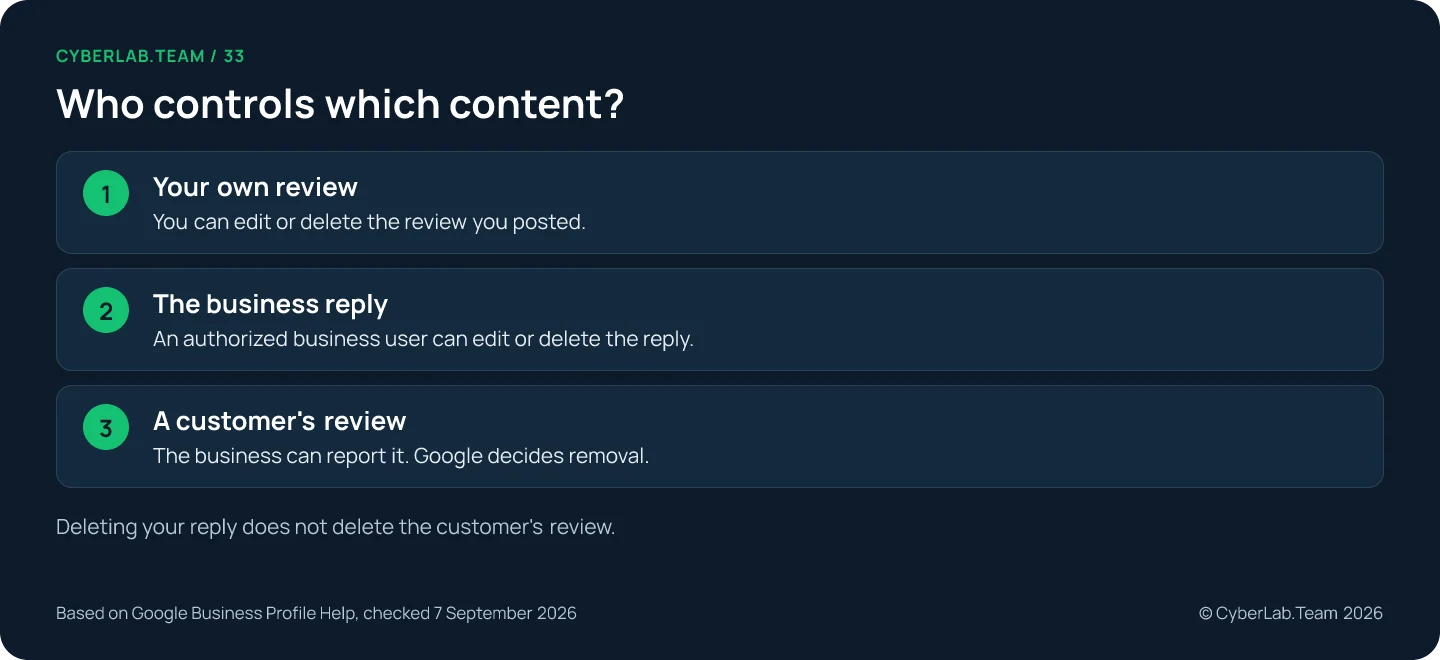
Start by identifying who wrote the content. Your own review goes through your Maps contributions, the business’s reply through the reply controls, and a customer’s review through a report, but only when a specific rule is at stake. Save the review link and your evidence before you reply or change the profile.
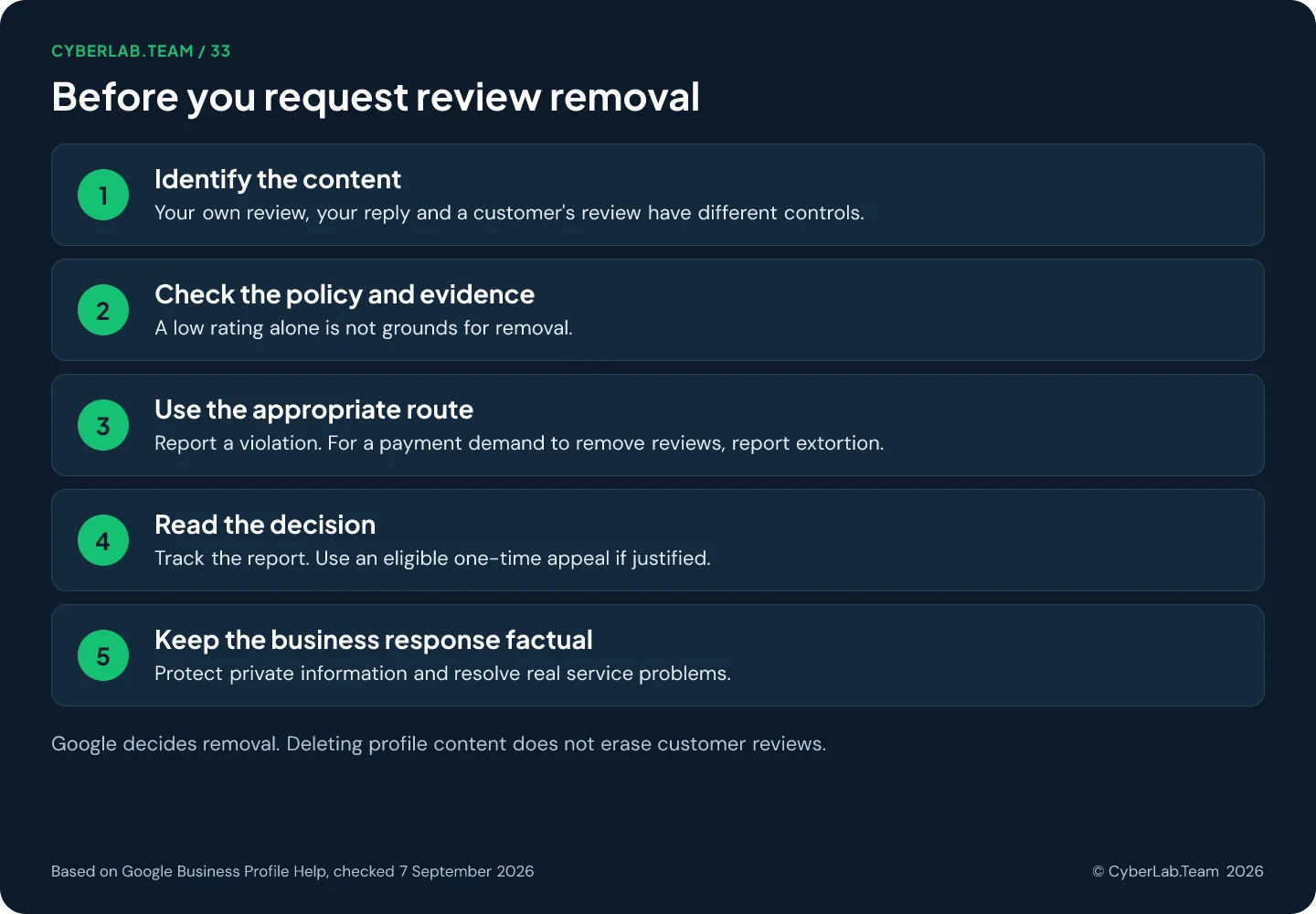
If you wrote the review yourself, use your contribution controls. If you wrote the business’s reply, use the reply controls. If a customer wrote the review, assess whether there is a specific reason to report it.
Before reporting, identify the review, the relevant rule and the facts supporting your concern. Preserve the review link and your supporting information before changing the profile or responding publicly.
The sequence in the chart is a practical order for the person handling the case. It does not predict whether Google will accept the report.
A vanished review, a suspected fake and a plain bad review are three different cases with three different routes. Keep them separate in the team’s working log:
| Situation | First action | What to record |
|---|---|---|
| Genuine service complaint | Investigate and prepare a useful reply, as described in the reviews guide | Concern, responsible person and next action |
| Possible policy violation | Compare the content with the relevant rule and report it | Review link, exact issue and supporting facts |
| Missing legitimate review | Check the circumstances and use the support route | Timing, profile changes and available details |
| Demand for payment to remove reviews | Preserve evidence and use the extortion channel | Messages, dates, review links and sender details |
Check whether the review actually violates a rule
Google allows respectful criticism, so a report needs a concrete policy issue: a fabricated experience, a conflict of interest, private information, threats, off-topic or repetitive content. A missing name in your records, a one-star rating without text or a tone you dislike does not qualify on its own. Build a short record someone else could verify.
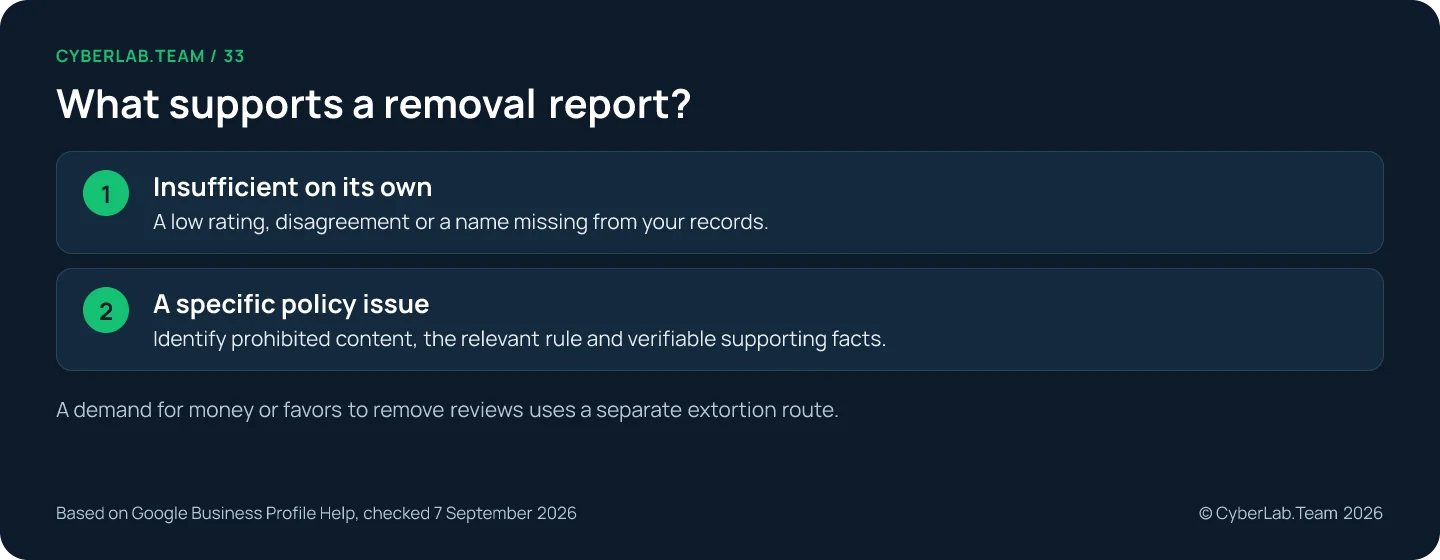
Google permits respectful descriptions of negative experiences. Its prohibited-content policy covers issues such as fabricated experiences, conflicts of interest, threats, private information, off-topic commentary and repetitive content.
Match the content to the rule, including its exceptions. The policy allows some public-facing professionals’ names, for instance, and distinguishes offensive profanity from inoffensive uses of a word. A phrase you dislike does not automatically meet a removal rule.
Do not treat “we cannot find this name in our records” as conclusive proof of a fake review. Maps permits pseudonyms, and your records may be incomplete or held under another person’s name. State the limits of the checks you performed.
We have filed such reports for clients. In the case we can describe, the review came from someone who had never been a customer, and Google removed it about a week after the report. That is a single case, so read it as an example rather than a processing time to plan around.
A one-star rating without text is not automatically invalid either. Google Maps lets people leave a rating and optionally add a written review. A report still needs a relevant concern, not an assumption that every rating requires an explanation.
Before alleging a conflict of interest, check the relationship you can substantiate. A review that sounds like a competitor wrote it is a lead to investigate, not proof of who posted it. Avoid naming a suspected person publicly without evidence.
Prepare a short record that another person can verify. Keep the original material and a separate explanation of why it matters.
| What to record | How to make it useful |
|---|---|
| Exact review | Save its direct link, visible text, rating and date observed |
| Relevant rule | Identify the specific policy issue and the relevant exception |
| Supporting facts | Explain what each record establishes and what it does not |
| Profile identity | Confirm the affected business and location |
| Case history | Keep the submission date, the decision and any appeal reference |
You can get a specific review link from its Share review option in Google Maps. Keep that link in your record so the person assessing the issue can find the content you mean.
State what you know and what you could not confirm. If you checked only one booking system or a limited date range, say so. Do not describe a partial search as a complete investigation.
Report the review through Google
Report from the profile: open Read reviews, choose Report next to the review, pick the reason that matches your evidence and send it. The Reviews Management Tool and the Report Review menu in Maps are alternative routes with slightly different labels. Attached photos or videos need their own report, and private data is described, not copied.
In the Business Profile, select Read reviews, use Report beside the relevant review, choose the appropriate reason and send the report. You can also start a new removal report through Google’s Reviews Management Tool.
Google Maps offers another route: open the business’s reviews, find the review, open its menu and select Report Review, then complete the form. Labels differ between Maps and the business-management interface.
Choose the reason that fits your evidence. Do not cycle through unrelated reasons to see which one works. Ask one person to coordinate the record so the team knows what was submitted and which decision it is waiting for.
A photo or video attached to the issue may need a separate report. Google’s instructions provide a Report a problem control for media. Identify the specific item instead of assuming that a review report automatically covers every related image.
For private or confidential information, explain what is exposed without copying it into a public reply. Google’s privacy guidance prohibits content such as medical records and financial details and provides an image-specific reporting route where relevant.
Read the status before appealing
Before you do anything else, read the decision where you filed the report. The Reviews Management Tool shows whether a report is pending, reviewed with no violation found or escalated; Maps uses different labels, including removed, not removed and restored. Save the exact status and date, because pending is not a rejection and escalated is not a promise.
If the review stays live, check the decision before choosing your next step. In the Reviews Management Tool, the status distinguishes a pending decision, a reviewed report with no policy violation found and an escalated appeal that requires an email check.
Record the status exactly as displayed, with the date you checked it. A pending report is not a rejection, and an escalation is not a promise that the review will disappear.
Google Maps also tracks reports for reviews and media. Its labels differ from the merchant tool and include content removed, not removed and restored. Record which interface produced the status, especially when several people are working on the case.
Use the one-time appeal when eligible
In the Reviews Management Tool, select the correct account and business, then the option to check a previously reported review and its appeal options. Choose Appeal eligible reviews, select the relevant review, continue to Submit an appeal and complete the form. The selection can include up to 10 reviews.
Use the appeal to explain the specific policy issue and the evidence supporting it, and lead with the clearest fact. If the initial report omitted context, say what you are adding; do not claim new evidence when you are resending the same material.
Keep each review’s reasoning separate when several are included. Similar timing can be relevant context, but it does not make every review in a group identical. Explain the connection you can establish and preserve individual links.
Google’s documented review appeal is a one-time opportunity. Check the result by email and save the decision beside your original report.
If the review remains after the decision, assign the next action deliberately: a service response, an eligible separate reporting route or closure of the case. Refreshing the rating again and again is not a substitute for reading the decision.
Handle a payment demand as a separate incident
A direct demand for money or favors to remove reviews is extortion in Google’s terms and has its own reporting channel. Do not pay or engage; keep the messages, dates, sender details and review links intact and hand them to whoever is authorized to assess the case. A burst of bad reviews with no demand stays a normal policy report.
When someone directly demands money or favors to remove negative reviews, use Google’s merchant extortion reporting channel. Google advises against paying or engaging with the sender.
Preserve the demand, the dates, the sender details and direct links to the reviews. The reporting form asks about the affected business, your relationship to it and the extortion attempt, with supporting screenshots or files.
A burst of negative reviews without a direct demand does not by itself establish an extortion case. Use the ordinary policy-reporting route for other suspected violations and describe the evidence you actually have.
Keep the original communications intact. If you prepare a translated explanation for the person handling the case, keep the original language beside it. Do not alter screenshots to make a message look stronger or attribute an unidentified sender to a competitor.
Separate incident handling from routine customer service. A person demanding money to remove reviews is not the same situation as a customer asking the business to correct a billing mistake. Give the evidence to the person authorized to assess that distinction.
Why a business cannot switch reviews off
No. Google documents no switch that lets a business turn reviews off. The only restrictions come from Google itself: temporary limits during abuse, longer limits for some places and categories such as schools for ages 6 to 18, and enforcement against fake engagement. Changing your category to trigger a restriction is misrepresentation, not a fix.
There is no general review-off control in the management options Google documents. Its documentation describes reporting individual reviews and Google-imposed contribution restrictions, which is the practical reason a business cannot simply switch reviews off.
Google can temporarily restrict contributions during abuse, or apply longer restrictions to some places and categories. Those decisions belong to the platform, not to a business choosing a preferred rating policy.
There are specific category exceptions. Google’s current guidance removes and disables reviews for general-education schools serving ages 6 to 18, while excluding institutions such as universities, day care centers and swim schools from that change.
Google may also restrict a business that violates fake-engagement rules, including preventing new ratings or hiding existing reviews temporarily. That is an enforcement measure with its own appeal route, not a useful way to manage criticism.
Do not change the business category to try to trigger a restriction. Keep the profile accurate and deal with the actual review issue through the relevant reporting process.
What removing or closing the profile does to reviews
No. Removing the profile from your Google Account keeps customer reviews and can permanently delete the business’s own replies and its management access. Requesting removal from Maps is for ineligible or nonexistent businesses, and marking a business closed leaves existing reviews in place. A duplicate profile for a clean score breaks the rules.
Removing profile content and managers from your Google Account leaves user reviews in place. It can permanently remove material posted by owners and managers, including their review replies, and it does not guarantee that the business disappears from Search or Maps.
That makes it a poor response to an unwanted review: you could lose the business’s replies and management access while the customer content stays. Read the consequences before using a profile-removal control.
Requesting removal of a business from Maps is a different procedure, intended for situations such as an ineligible or nonexistent business. It is not a replacement for reporting a specific review, and a false closure or eligibility claim is not an option.
Google says existing reviews remain when a business is temporarily or permanently closed. A permanently closed business cannot receive new reviews, but the closure status must reflect the real situation.
A change of management under the same business name also leaves reviews in place. Relocations and larger business changes have their own rules and exceptions. Do not create a duplicate profile to start with a clean score.
Reviews that come from another website
Read the source label first. Reviews that originate on another site are handled by that site, and Google generally sends you there; companies in the European Economic Area may also report such reviews on Google. If reviews for a different business were attached to yours, that is a support case, and one platform’s update does not change every surface.
Check the source label before reporting. Some reviews displayed on a Business Profile originate on third-party sites, and Google’s guidance generally directs businesses to the originating website for issues with them.
Businesses in the European Economic Area can also report third-party reviews directly on Google. That exception matters, but do not assume it applies to every country or every reporting interface.
If reviews for a different business have been attached from another website, Google’s guidance points to support. Record the source link, both business identities and the mismatch rather than describing it only as a bad rating.
Keep the originating site’s decision separate from Google’s display. An update on one platform is not evidence that every surface has changed. Check the specific review and location again before marking the case complete.
When a legal or EU resolution route may apply
A policy report and a legal notice are different things. Google’s Report Content On Google tool is the separate route for legal issues: it asks which product contains the material, so choose the relevant Maps product. Whether a review is unlawful depends on the applicable law and the facts, a question for a qualified lawyer in the relevant jurisdiction; calling a complaint defamatory does not establish a ground for removal.
For users and disputes covered by the EU Digital Services Act, a certified out-of-court dispute settlement body may be available after a moderation decision, including a decision not to remove reported content. The European Commission maintains the list of bodies. Check that a body’s scope covers the platform, the dispute type and the language. These bodies do not impose a binding settlement, and we have no example of the route in use to show, so treat it as a pointer rather than a plan.
If the review stays
When the review remains, the public reply is the part you still control; the reviews guide has the wording and the fact check. Two rules from this side of the process: a service remedy must not depend on the customer removing or changing the review, because Google prohibits incentives for that, and a supplier’s promise is not Google’s removal decision.
If an agency is helping, specify its authorization and deliverables. Google’s third-party rules require transparent claims, retained business ownership and explicit approval for replies. Keep ownership and account security under the business’s control, review access requests, and never hand over a verification code because someone says it will speed up review removal.
Smaller questions once a report is filed
How do I delete a Google review I wrote myself?
On a computer, sign in to Google Maps with the account that posted it. Open Menu, then Your contributions and Reviews. Use More beside the review, choose Delete review and follow the prompts. These controls apply only to your own contribution.
How do I delete the business’s reply?
Open Read reviews in the Business Profile and use Delete under the reply, then confirm. Deleting your response does not delete the customer’s review.
Can I report the reviewer’s entire profile?
Google allows reports of user profiles that violate its policies. In the Maps app, open the user’s profile from their contribution and use its reporting option. Do not report someone merely because their accurate, relevant review is unwelcome.
Can I tell from the review count or the star average whether the report worked?
Not reliably. Reviews can be delayed, filtered or affected by profile changes, some legitimate reviews are removed by mistake, and the displayed average can lag up to two weeks behind new ratings. Check the report decision and whether the specific review is still visible.
Can a removed review come back?
Yes. Google’s reporting guidance includes restored content and reserves the ability to reinstate or remove material after further assessment. Record the outcome you observed on a particular date instead of promising that a review can never return.
If you are not sure whether a review meets a rule, send us the review link, the date you saw it and what you have on record about the reviewer or the visit, and we will tell you which route fits before you file anything. If the review stays, the reviews guide covers the public reply and the fix behind it.
Sources
Google and European Commission pages this article relies on. Google pages checked 7 September 2026.
- Google Business Profile Help. “Report inappropriate reviews on your Business Profile.” https://support.google.com/business/answer/4596773
- Google Maps Help. “Prohibited and restricted content.” https://support.google.com/contributionpolicy/answer/7400114
- Google Maps Help. “Add, edit, or delete Google Maps reviews and ratings.” https://support.google.com/maps/answer/6230175
- Google Business Profile Help. “Report negative review extortion scams.” https://support.google.com/business/answer/16404809
- Google Business Profile Help. “About third-party reviews.” https://support.google.com/business/answer/10286840
- Google Business Profile Help. “Business Profile restrictions for policy violations.” https://support.google.com/business/answer/14114287
- Google Maps Help. “Posting Restrictions.” https://support.google.com/contributionpolicy/answer/13036130
- Google Business Profile Help. “About missing or delayed reviews.” https://support.google.com/business/answer/10313341
- Google Business Profile Help. “Request removal of a Business Profile from Search and Maps.” https://support.google.com/business/answer/16043467
- Google Business Profile Help. “Remove a Business Profile from your Google Account.” https://support.google.com/business/answer/4669092
- Google Maps Help. “Report inappropriate user profiles.” https://support.google.com/contributionpolicy/answer/9968060
- Google Business Profile Help. “Understand review scores for local places and businesses.” https://support.google.com/business/answer/4801187
- Google Business Profile Help. “Business Profile third-party policies.” https://support.google.com/business/answer/7353941
- Google. “European Union Digital Services Act Resolution Options.” https://support.google.com/european-union-digital-services-act-redress-options/answer/13535501
- European Commission. “Out-of-court dispute settlement under the DSA.” https://digital-strategy.ec.europa.eu/en/policies/dsa-out-court-dispute-settlement
- Google Legal Help. “Report Content On Google.” https://support.google.com/legal/troubleshooter/1114905