
On October 2, 2026, the last day of Search Central Live Deep Dive in Barcelona, Gary Illyes of Google put up three slides titled “How long does it take to…”: crawl, index and serve. Each listed Google’s processes with a minimum, a typical and a slowest time, taken from Google’s internal analysis. John Campbell of the agency ROAST was in the room and published the tables the same day. He called it brand new information, and for anyone who has answered “when will Google pick this up?” with “it depends”, it is.
After the tables spread, Gary told Barry Schwartz that the slides were “an exercise to see if the audience can relate to the numbers we pulled internally” (Search Engine Roundtable). We read them in that spirit, put each row next to what Google’s own documentation says, checked the rollout claims against the Search Status Dashboard and compared ROAST’s tables with two other attendee records. The result is a guide to what the numbers mean, where they disagree with Google’s written guidance, and how long to wait after you change something on a small business site. The rest of Day 3 is summarized at the end.
What did Google show in Barcelona?
Gary Illyes showed how long 23 of Google’s processes take, split into crawling, indexing and serving, with a minimum, a typical and a slowest time for each. Most typical times are short, from hours to a few weeks. The slowest ones stretch to months or a year, and five of them include the word “never”.
Each slide placed the processes on a scale running from seconds to a year. ROAST copied the typical and slowest columns into three tables, and Search Engine Roundtable, Search Engine Journal, PPC Land and others reprinted them within days. The minimums were not transcribed, but they are visible in ROAST’s photo of the indexing slide further down, together with its footnote: the times are “based on internal analysis”.
Two attendee records do not depend on ROAST. Ibrahim Anjro compiled an open knowledge base of the event from the recording and the slides, and Liv Day of Digitaloft wrote a summary. Both match ROAST on every typical number they report, although Digitaloft covers only about half of the rows. The knowledge base also notes, in its author’s words, that the discovery time is an average “across all sites it knows of” and that Gary called the 1.5-hour indexing average “probably lowered by selection bias, because so many news sites push out articles”. Gary stressed that the processes are chained: a page cannot be indexed before it is crawled, so the delays add up.
Google has not said which sites or which period the “typical” values describe, a gap Search Engine Journal pointed out. Our reading: these are averages for the web as a whole, pulled toward the fast end by large sites that publish all day. A small business site with a few dozen pages is more likely to sit toward the slow end of each row.
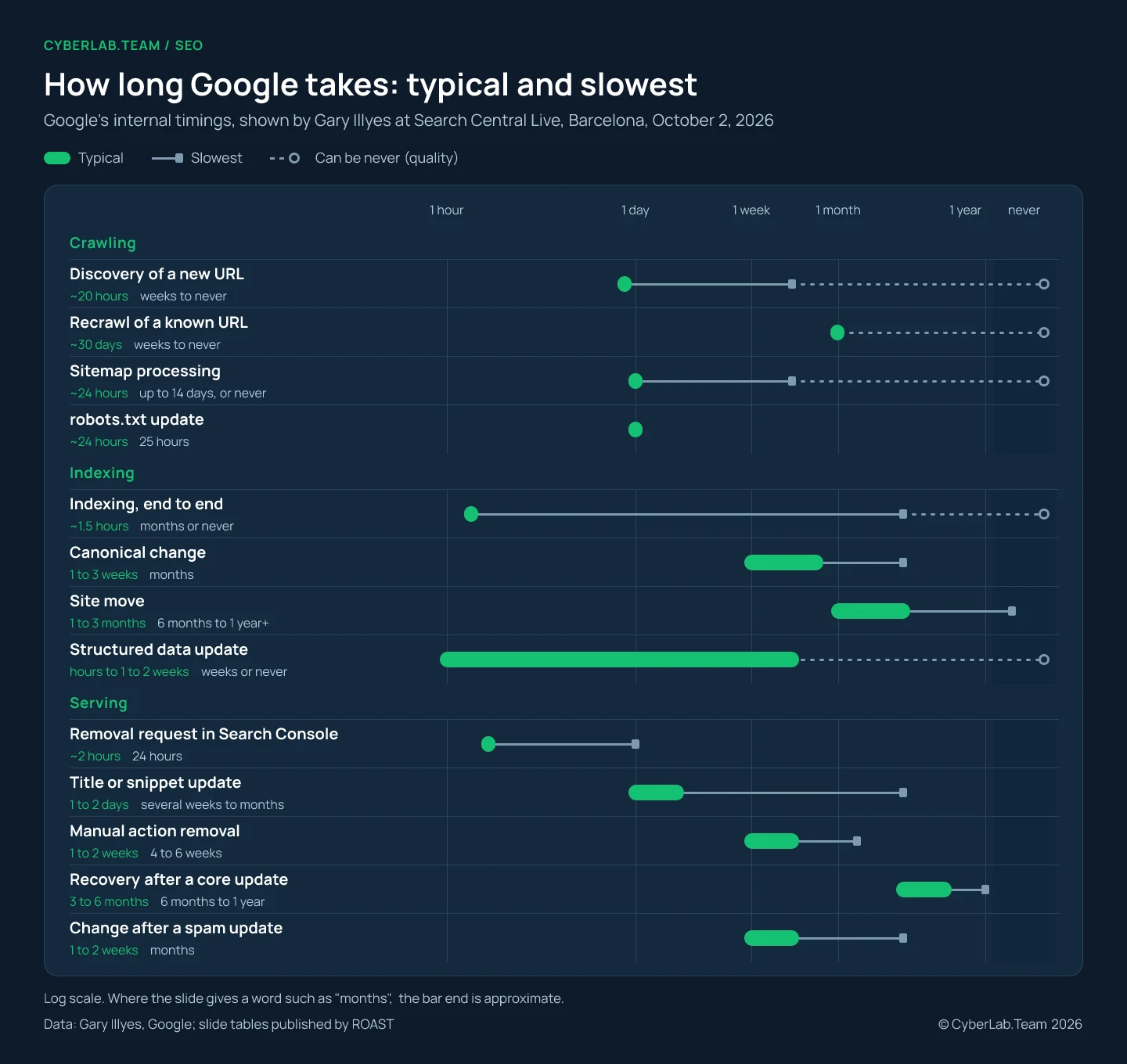
How long does crawling take?
By the slide’s numbers, Google finds a new URL in about 20 hours and comes back to a known one roughly once a month. A robots.txt change is picked up within a day. Google’s written guidance is more cautious: it gives days or weeks even for a crawl you request, and it promises no crawl at all.
| Process | Typical | Slowest | What Google’s documentation says |
|---|---|---|---|
| Discovery of a new URL | ~20 hours | Weeks to never | A requested crawl takes “a few days to a few weeks” |
| Recrawl of a known URL | ~30 days | Weeks to never | No figure; a revisit to see a new noindex “may take months” |
| Sitemap processing | ~24 hours | Up to 14 days, or never (quality) | A submitted sitemap “should be fetched immediately” and is “merely a hint” |
| robots.txt update | ~24 hours | 25 hours | Cached “for up to 24 hours”, longer if a refresh fails |
| Crawl capacity update | 4 hours to 1-2 weeks | 1-3 weeks (in recovery) | Google “gradually increases” the crawl rate once errors stop |
| Crawl demand update | ~20 hours | Weeks to months | No figure |
The row that matters most for a small business is the recrawl. Change a price, a phone number or opening hours on a page Google rarely revisits, and its stored copy can stay out of date for a month or more. Five days after the event ROAST published data from its own site: across 178 URLs checked every day for 30 days, the average time since Google last crawled a page was 39.2 days. The homepage lag was 1.6 days. That is one agency site, but it shows how far a single site can sit from the web-wide 30 days.
For the pages that do change, the URL Inspection tool lets you request indexing of one URL at a time, though Google’s recrawl guide notes there is a quota and that asking again for the same URL “won’t get it crawled any faster”. A sitemap covers the whole site, but Google reads its lastmod date only “if it’s consistently and verifiably” accurate. A CMS that stamps today’s date on every page every day gives Google a reason to ignore the field.
robots.txt is the one row where the slide and the documentation agree on the typical time, 24 hours, although the documentation adds that Google may keep the cached copy longer when a refresh fails. If you unblocked something important, you can ask Google to fetch the file again from the robots.txt report, but Google warns that this “doesn’t guarantee an immediate recrawl of unblocked URLs”.
Crawl capacity is the row to remember before a sale or a hosting change. ROAST reports that it can drop in seconds when Google backs off, and the slide puts recovery at one to three weeks. Google’s crawl budget guide names the trigger: when a site slows down or answers with 5xx errors or 429s, “the limit goes down and Google crawls less”. On Day 1 of the same event, Google’s speakers named CDNs that block Googlebot and challenge pages that return 200 OK as growing problems (ROAST, Day 1). By the slide’s numbers, a firewall rule that treats Googlebot as an attack for one weekend can cost weeks of slower crawling.
How long does indexing take?
Once Google has a page, the slide puts indexing at about an hour and a half. Structural changes take longer: one to three weeks for a canonical change, one to three months for a site move. Google’s help pages are slower than the slide on indexing and faster than the slide on site moves.
| Process | Typical | Slowest | What Google’s documentation says |
|---|---|---|---|
| Rendering | Seconds to render, hours in the queue | Days to weeks | A page may wait in the queue “a few seconds, but it can take longer” |
| Meta annotations | 45-90 minutes | 1-4 days | A noindex is seen only after a recrawl, which “may take months” |
| Link annotations | Minutes to 1-3 weeks | Months | No figure |
| Indexing, end to end | ~1.5 hours | Months or never (quality) | “a day or so”, “a few days” and “up to a week or two”, all on one help page |
| Removal | 1-3 weeks | Months | No figure |
| Canonical change | 1-3 weeks | Months (conflicting signals) | No figure; server-side redirects give “the quickest effect” |
| Site move | 1-3 months | 6 months to 1 year+ | “a few weeks” for a small to medium site |
| Structured data update | Hours to 1-2 weeks | Weeks or never (quality) | No figure |
| Images | Hours to days | Weeks to months | No figure |
| Videos | Hours to days | Weeks to months (deep analysis) | The video report says to “check back in a few days” |
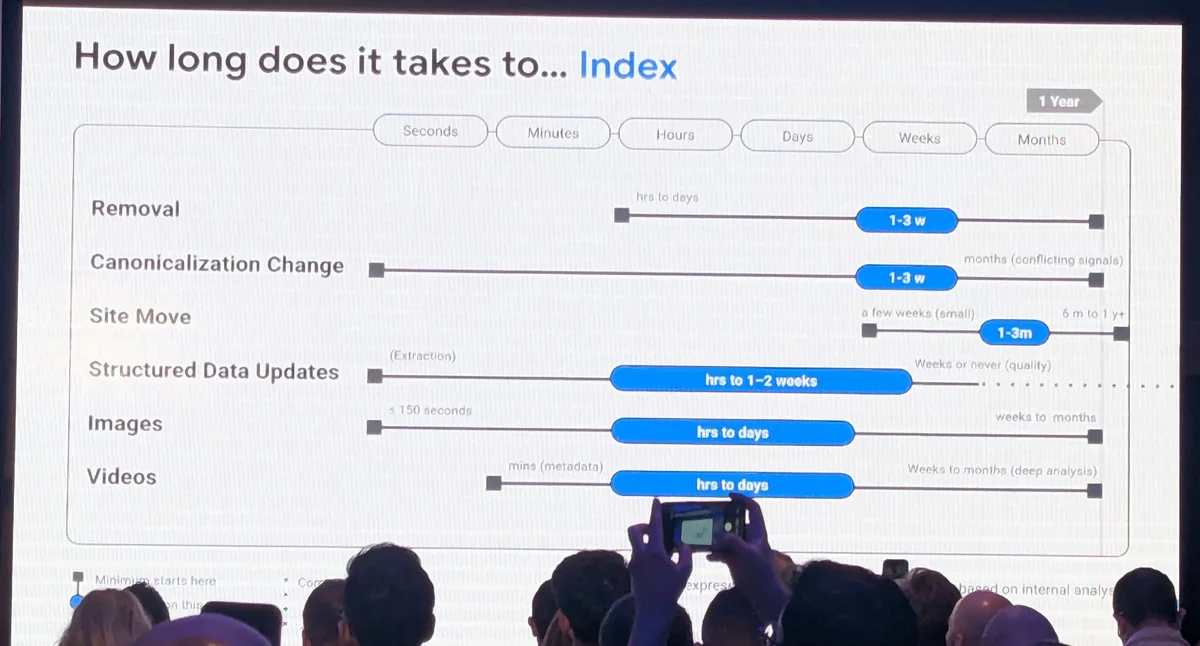
The 1.5 hours and the help page’s “a day or so” probably measure different things. ROAST explains that end to end means “all the critical processes finish successfully”. The help page describes what a site owner sees after asking for indexing, crawl wait included. Add Gary’s remark about news sites, and both figures can be true at once.
The slow end of that row is the one small sites run into. In the Page indexing report, “Crawled - currently not indexed” means Google fetched the page and left it out; Google says it “may or may not be indexed in the future” and that there is no need to resubmit it. When a site owner complained in 2025 that only four pages of a months-old site were indexed, John Mueller answered that “often that’s a sign that our systems aren’t convinced about the site overall”. Tools that track indexing see a long tail too: IndexCheckr, which sells such a tool, reports an average of 27.4 days for the pages its users monitor, counted from when tracking began.
Site moves go the other way. Google’s guide says “a small to medium-sized website can take a few weeks for most pages to move, and larger sites take longer”. The slide agrees on the minimum, which reads “a few weeks (small)” in the photo, but puts the typical move at one to three months and the slowest at six months to more than a year. The same guide says to keep redirects “generally at least 1 year”. Traffic runs on a separate clock. In a study of 892 domain migrations by Dan Taylor of the agency 10 Spurs, the new domain took 523 days on average to reach the old domain’s organic traffic. That study used third-party traffic estimates and a crowdsourced sample, so its average says more about the risk than about any one site.
For canonical changes, the slide’s slowest case names its own cause: conflicting signals. When the canonical tag says one URL, internal links and the sitemap point to another and a redirect to a third, Google needs months to settle. John Mueller’s advice on Day 2 was to use redirects for site moves and keep canonical signals clear (ROAST, Day 2). Structured data carries the same “or never” as indexing: markup on a page Google rates low may never turn into a rich result, however valid it is.
How long until changes show in search results?
By the slide’s numbers, a new title or snippet typically shows in one to two days, and a manual action is lifted one to two weeks after a reconsideration request. Recovery after a core update is the slow one. Three to six months is typical, and in the slowest case a site waits for the next core update.
| Process | Typical | Slowest | What Google’s documentation says |
|---|---|---|---|
| Removal request in Search Console | ~2 hours | 24 hours | “usually takes up to a day to process” |
| Snippet update | 1-2 days | Several weeks to months | No figure |
| Title update | 1-2 days | Several weeks to months | “a few days to a few weeks” |
| Image next to a text result | 1-2 weeks | Several weeks to months | No figure |
| Manual action removal | 1-2 weeks | 4-6 weeks, much longer for dormant sites | Reviews take “several days or weeks” |
| Recovery after a core update | 3-6 months | 6 months to 1 year (next core update) | “several months”, or “waiting until the next core update” |
| Change after a spam update | 1-2 weeks (continuous) | Months (batch refreshes) | Systems learn “over a period of months” |
The Removals tool is the fastest lever on the list, and here Google’s help page matches the slide. It hides a URL from results for about six months, and Google notes that blocking a URL does not stop Google from crawling the page. A permanent removal still needs a change on the page itself, and then the slower indexing clock applies.
Core update recovery is where a realistic number matters most. Google’s core updates page says some changes “can take effect in a few days, but it could take several months”, and if a few months pass with no effect, “that could mean waiting until the next core update”. The knowledge base records a qualifier that ROAST’s table lost: recovery takes three to six months “once the site has put in work to regain traffic”, so the clock starts when the fixes are done. Past cases suggest even that can be optimistic: after the September 2023 helpful content update, Search Engine Roundtable reported the first recoveries only with the August 2024 core update, eleven months later, and Glenn Gabe counted 47 sites with surges among the 380+ he tracked.
For manual actions, the slide adds something the documentation does not mention: dormant sites wait much longer. The help page itself says link-related reviews can take longer than usual and asks you not to send a new request before you get a decision on the last one.
How long do core and spam updates take to roll out?
In ROAST’s tables, core updates roll out in two to four weeks and spam updates in one to two days. Google’s own Search Status Dashboard shows a wider spread: the nine core updates since March 2024 took between 6 and 45 days, and the eight spam updates between 19.5 hours and nearly four weeks.
| Update | Rollout on the Search Status Dashboard |
|---|---|
| March 2024 core update | 45 days |
| August 2024 core update | 19 days, 4 hours |
| November 2024 core update | 23 days, 13 hours |
| December 2024 core update | 6 days, 4 hours |
| March 2025 core update | 13 days, 21 hours |
| June 2025 core update | 16 days, 18 hours |
| December 2025 core update | 18 days, 2 hours |
| March 2026 core update | 12 days, 4 hours |
| May 2026 core update | 11 days, 21 hours |
| March 2024 spam update | 14 days, 21 hours |
| June 2024 spam update | 7 days, 1 hour |
| December 2024 spam update | 7 days, 2 hours |
| August 2025 spam update | 26 days, 15 hours |
| March 2026 spam update | 19 hours, 30 minutes |
| June 2026 spam update | 2 days, 1 hour |
| August 2026 spam update | 2 days, 16 hours |
| September 2026 spam update | 13 days, 16 hours |
Four of the nine core updates fell inside two to four weeks. Of the four spam updates in 2026, two came close to ROAST’s one to two days: March took 19.5 hours and June two days. August took 2 days and 16 hours, and September ran 13 days and 16 hours; Gary spoke eight days into that one, as PPC Land noted. Google’s own launch notes on the dashboard are hedged: “may take up to 2 weeks”, “up to 3 weeks”, “up to a month”.
The knowledge base reads the same line on the slide differently: a core update affects a site within two to four weeks of the start of its rollout, and a spam update within one to two days. On that reading the slide describes when a site feels the change, and the dashboard durations above do not contradict it. We tested ROAST’s wording because it is the version that spread.
For your own analysis, the most useful number Google has published is still the one on its core updates page: wait “at least a full week after a core update completes” before you read the data in Search Console.
Why does “never” keep coming up?
On the slides, “never” sits next to discovery, recrawling, sitemaps, indexing and structured data, and ROAST notes it is usually tied to quality. A faster server will not rescue a page Google does not think is worth keeping. Google’s guide to how Search works says it plainly: Google “doesn’t guarantee that it will crawl, index, or serve your page”.
Duy Nguyen, a search quality analyst at Google, gave the quality talk earlier the same day. He described quality as hundreds of signals that differ by type of result, with Google testing changes all the time. His advice was to read the public rater guidelines, which judge content by effort, originality, talent or skill, and accuracy. Those four words entered Google’s helpful content guide on October 1, the day before; we covered that change in our article on main content. He also said Google judges the quality of a page whoever wrote it. Low quality can be human or AI generated, and Google’s spam policies call mass-produced pages scaled content abuse “no matter how it’s created”.
Gary closed the morning with one number: Google filters out 40 billion spam pages a day. The figure first appeared in Google’s webspam report for 2020, published in April 2021 (“every day, we discover 40 billion spammy pages”), up from 25 billion in the report for 2019. Google’s How Search Works page on spam still uses it, and we found no newer count. His warning that scaled content is now a bigger problem than link spam came with no published data, so it stands as an assessment from inside the team.
He also said core updates work at page level, not domain level, which is why some pages on a site rise while others fall. Google’s ranking systems guide says its systems “are designed to work on the page level”, then adds: “Site-wide signals and classifiers are also used”. So each page is judged on its own, against what Google thinks of the site around it.
Where the slide and Google’s documentation disagree
In most rows the slide is just more precise than the documentation, which gives no figure at all. In a handful of places the two point in different directions, so it is worth knowing which source a number comes from before you quote it to a client or a manager:
- Indexing: about 1.5 hours on the slide, “a day or so” to “up to a week or two” in the help pages.
- Site moves: one to three months typical on the slide, “a few weeks” for small and medium sites in the guide.
- noindex and other meta annotations: at most four days on the slide; the documentation warns a revisit “may take months”. Both can be true if the slide counts from the recrawl.
- Rollouts, as ROAST reads the slide: two to four weeks for core updates and one to two days for spam updates; 6 to 45 days and 19.5 hours to nearly four weeks on the dashboard.
- Page level: “not at domain level” on stage; site-wide signals “are also used” in the guide.
The attendee records also differ in one place: for link annotations ROAST lists “months” as the slowest time, while the knowledge base reads the end point on the slide as about one year.
Our reading of the gap: the documentation is written to be safe for every site and is rarely revised, while the slide shows measured averages across the web. Neither one is a promise for your site.
What else Google said on Day 3
Besides the timings, Day 3 covered how Google reads a query, how quality and spam are judged, how content enters Discover, new product data for AI shopping, and Search Console. Most of it matches what Google has already published. A few points, mostly about how queries are rewritten, so far exist only as things said on stage.
John Mueller opened with query understanding. Google detects the language, drops stop words unless they belong to a name, recognizes entities and expands synonyms, so “fried chicken place in barcelona” is searched as if it said place OR area OR location OR restaurant. Some synonyms depend on context: GM means General Motors next to “car” and genetically modified next to “barley”. “Siblings” such as Canon and Nikon are learned from people’s “X vs Y” searches and kept apart. Google’s How Search Works mentions a “sophisticated synonym system”, but siblings and the OR-style rewriting appear in no document we found. For AI Overviews and AI Mode the model adds query fan-out, which Google’s AI features page describes as “issuing multiple related searches across subtopics and data sources”. Mueller said fan-out queries do not show in Search Console, because they do not come from users. Gary then explained retrieval: before ranking, Google narrows the index to candidate pages, language and country are important signals at that step, and quality makes the final call.
Eric Murillo, who works on trust and safety for Discover at Google, said there is no special Discover bot: content comes from the normal index and passes an eligibility gate. His image advice matches Google’s Discover documentation line for line: at least 1,200 px wide, more than 300,000 pixels, a 16:9 ratio and max-image-preview:large. The rest of Discover is in our Discover guide.
Alex Jansen, a software engineer at Google, presented conversational attributes for shopping. They are documented: six optional Merchant Center attributes, announced on May 20, 2026, that “help AI systems and conversational agents better understand your products’ specific nuances” (Merchant Center Help). His kettle example is Google’s own: the help page for the question and answer attribute uses a tea kettle with five FAQs. He also pointed to product highlights, where each product can carry 2 to 100 highlights and Google recommends four to six.
Ariel Kroszynski, who manages front-end engineering for Search Console, went through the past year: query groups in the Insights report (October 2025, only for properties with many queries), AI-powered configuration of the Performance report (December 2025, first for a limited set of sites) and web multimodal reporting (September 24, 2026). ROAST writes that there was no update on generative AI reporting. That means nothing new was announced: the Generative AI performance report has existed since June 3, 2026 and reached all sites on August 31. It shows how often your pages appeared in AI Overviews and AI Mode, by page, country, device and date, without query data, which fits what Mueller said about fan-out.
Pablo Pérez, a senior marketing research and insights manager at Google, returned to the 2020 Messy Middle model, in which shoppers loop between exploring and evaluating. His new point was that AI lets people research longer before they buy, and that UK search interest in “is [brand] legit” has climbed since 2020 and peaked in 2026. We could not check that series ourselves; it comes from the talk.
Gary closed the three days by saying that AI features in Google Search use the same processes as traditional results. Google’s guide to generative AI features says the same in writing: optimizing for generative AI search “is optimizing for the search experience, and thus still SEO”. We looked at that position in Good SEO is good GEO.
What practitioners brought to the stage
Community speakers brought case numbers from their own work. None came with a published method, so read them as examples: these are figures the speakers showed, as reported by ROAST. Most of them measured what a page did for the business, from conversions to enquiries and questions to the sales team.
- Robert Wojno of Hostinger compared a broad “What is VPS hosting?” guide with 1.6 million impressions and a niche guide to running a Palworld server with 46,000. The niche page had a click-through rate 23 times higher and converted better.
- Juan Seguí of acceseo added detailed FAQs that answer questions real parents ask, such as whether a double pram fits in a lift with the parent inside. Organic clicks rose 14% and pre-sale questions to the team fell.
- Noe Rivas of seosve paired a page with a video for newcomers to a topic, and the result ranked in AI Overviews, Gemini, YouTube and image search.
- Nik Vujic of Get Stuff Digital runs LLM agents over Search Console and GA4 data to track how many queries each article ranks for over time.
- Alex Wright of iDHL showed a brand whose organic sessions fell by 47% while direct sessions held (down 2%). Enquiries per 100 search clicks grew 2.7 times, the brand’s share of all search clicks went from 17% to 38%, Google Ads click-through rate rose 36% at a flat ad position, and 83% of its AI citations came from sites it does not own.
For a small business, Wright’s case is the most useful: clicks fell while enquiries per click rose. Leads per month is the number that matters, and Search Console clicks on their own can tell the wrong story.
What this means for a small business site
The slide is most useful for deciding when to check on a change. If a change has gone well past the typical time, investigate; if it is still inside the range, wait. For most small sites the honest expectation sits between the slide’s typical value and the more cautious figure in Google’s documentation.
| You changed | Typical wait on the slide | When to look | Where to look |
|---|---|---|---|
| Published a new page, linked and in the sitemap | About a day to be found, then hours to index | After a week | URL Inspection, Page indexing report |
| Edited prices, hours or text on an existing page | Up to ~30 days for a routine recrawl | Request indexing for that URL, check in a few days | URL Inspection, last crawl date |
| Rewrote a title or meta description | 1-2 days | After two weeks | Search results, Performance report |
| Fixed robots.txt | ~24 hours | The next day | robots.txt report |
| Merged duplicates or set canonicals | 1-3 weeks | After a month | URL Inspection, Google-selected canonical |
| Moved to a new domain or changed URLs | 1-3 months | Monthly, for at least three months | Page indexing and Performance in both properties |
| Added structured data | Hours to 1-2 weeks | After two weeks | Rich result reports |
| Fixed a manual action and asked for review | 1-2 weeks after the request | When Google replies | Manual actions report |
| Lost traffic in a core update | 3-6 months after the fixes | A week after the rollout ends, then monthly | Performance report, Search Status Dashboard |
Today, open the Page indexing report. Pages under “Crawled - currently not indexed” sit in the slide’s “never” column for now, and requesting indexing again will not move them; a better page might. “Discovered - currently not indexed” is different: Google says it usually means the crawl was postponed so as not to overload the site, so a long list there is a reason to look at server speed.
This week, check that your CDN or bot protection lets Googlebot through and that challenge pages do not return 200 OK. Check that the lastmod dates in your sitemap change only when a page changes. If you are planning a migration, keep the redirects for at least a year and plan the first three months around the move.
From then on, write the expected date next to every change, using the table above. A slow week then does not look like a problem, and a real problem does not get left for months.
These are Google’s averages. Nobody outside Google, us included, can promise when Google will crawl, index or re-rank a page. What an audit can do is tell you which column of the table your pages are in and why. If pages sit in “never”, our SEO site audit starts there.
Sources
The event:
- John Campbell, “Google Search Central Live Deep Dive, Barcelona, Day 3 Recap”, ROAST, October 2, 2026: weareroast.com; Day 1, September 30, 2026: weareroast.com; Day 2, October 1, 2026: weareroast.com
- John Campbell, “How Often Does Google Recrawl Pages? Real Data from the ROAST Website”, ROAST, October 7, 2026: weareroast.com
- Ibrahim Anjro, “Search Central Live Deep Dive Europe 2026: The Knowledge Base”, session D3-S17 “How long does it take to..?”, GitHub: github.com
- Liv Day, “Google Search Central Live Deep Dive Europe 2026: A Summary”, Digitaloft, October 4, 2026: digitaloft.co.uk
- Google Search Central Blog, “Search Central Deep Dive Europe 2026”, July 6, 2026: developers.google.com
- Barry Schwartz, “Google Search Data On Crawling, Indexing & Serving Timelines”, Search Engine Roundtable, October 5, 2026: seroundtable.com
- Matt G. Southern, “Google Shows How Long Crawling, Indexing & Recovery Can Take”, Search Engine Journal, October 4, 2026: searchenginejournal.com
- “Google says new pages take about 20 hours to be found, some never are”, PPC Land, October 3, 2026: ppc.land
Google documentation on crawling, indexing and serving:
- Ask Google to recrawl your URLs: developers.google.com
- URL Inspection tool, Search Console Help: support.google.com
- Page indexing report, Search Console Help: support.google.com
- Build and submit a sitemap: developers.google.com; Sitemaps report, Search Console Help: support.google.com
- How Google interprets the robots.txt specification: developers.google.com; robots.txt report, Search Console Help: support.google.com
- Crawl budget management: developers.google.com; How HTTP status codes affect Google’s crawlers: developers.google.com
- Understand JavaScript SEO basics: developers.google.com
- Block search indexing with noindex: developers.google.com
- How to specify a canonical: developers.google.com
- Site moves and migrations: developers.google.com
- Video indexing report, Search Console Help: support.google.com
- Removals tool, Search Console Help: support.google.com
- Influencing title links: developers.google.com
- Manual actions report, Search Console Help: support.google.com
- Google Search’s core updates: developers.google.com; Google Search spam updates: developers.google.com
- Google Search Status Dashboard, Ranking history, read October 27, 2026: status.search.google.com
- In-depth guide to how Google Search works: developers.google.com
Google on quality, spam and AI features:
- Creating helpful, reliable, people-first content: developers.google.com
- Spam policies for Google web search: developers.google.com
- How we fought Search spam on Google in 2020, April 29, 2021: developers.google.com; Webspam report 2019, June 9, 2020: developers.google.com
- How Search Works, Detecting spam: google.com; Ranking results: google.com
- A guide to Google Search ranking systems: developers.google.com
- AI features and your website: developers.google.com; Optimizing your website for generative AI features on Google Search: developers.google.com
- Discover and your website: developers.google.com
- Merchant Center Help: conversational attributes support.google.com, question and answer support.google.com, product highlight support.google.com; Google Marketing Live shopping updates, May 20, 2026: blog.google
- Search Central Blog: query groups, October 2025 developers.google.com; AI-powered configuration, December 2025 developers.google.com; Generative AI performance reports, June 3, 2026 developers.google.com; web multimodal reporting, September 24, 2026 developers.google.com
- Think with Google, “Navigating purchase behavior and decision-making”, July 2020: thinkwithgoogle.com
Independent data and practitioners:
- “Google says poor indexing on strong hosting indicates quality issues”, PPC Land, July 16, 2025: ppc.land
- Joel Cariño, “Google Indexing Study: Insights from 16 Million Pages”, IndexCheckr, February 28, 2025: indexcheckr.com
- Dan Taylor, “How Long Should An SEO Migration Take? [Study]”, Search Engine Journal, January 8, 2025: searchenginejournal.com
- Barry Schwartz, “Reports Of Google Helpful Content Update Resurrections With August 2024 Core Update”, Search Engine Roundtable, August 2024: seroundtable.com