
Ask a search engine how often you should audit a website for SEO and the first page hands you a calendar: twice a year, every quarter, every month, sometimes every week. The intervals differ from one agency to the next, and none of them comes from Google. Google’s own documentation says something plainer. Look at Search Console about once a month, and bring in outside help when you are planning a redesign or a new site.
The honest answer lies between those two statements and depends mostly on what has changed on your site since the last check. Below: the monthly check, what only a full audit finds, the moments that call for one, a schedule by rate of change, and what no audit (ours included) can promise.
The short answer: check monthly, audit when something changes
For most small and mid-size business sites, a light Search Console review once a month catches trouble early, and that rhythm comes from Google itself. A full audit belongs before and after a migration or redesign, after a traffic drop that lines up with a core update, and on a baseline cycle that matches how often the site changes.
Google’s guide to Search Console says there is “no need to sign in to the tool every day,” because the tool emails you when it finds new issues. It then suggests checking “around once every month, or when you make changes to the site’s content.” The second half of that sentence is the part the calendar articles leave out. A site nobody has touched in a year will produce much the same audit twice. A site that switched themes last week can ship a broken template the same afternoon.
Where the usual “every quarter” advice comes from
The popular schedules are agency rules of thumb. They agree that bigger, busier and more competitive sites need more attention, and they disagree on the numbers: twice a year, three to six months, or a tier by page count. Of the five we read, none points to a Google document for its interval.
Among the pages ranking for this question, Semrush says “at least twice a year,” and monthly or even weekly in fast moving industries. The Ahrefs glossary says every three to six months. NAV43 tiers it by size: annual for brochure sites of 10 to 50 pages, twice a year for 100 to 500 pages, quarterly for large shops and publishers. Volume Nine audits smaller sites only after a big change or problem. WebYes suggests six months for small or static sites.
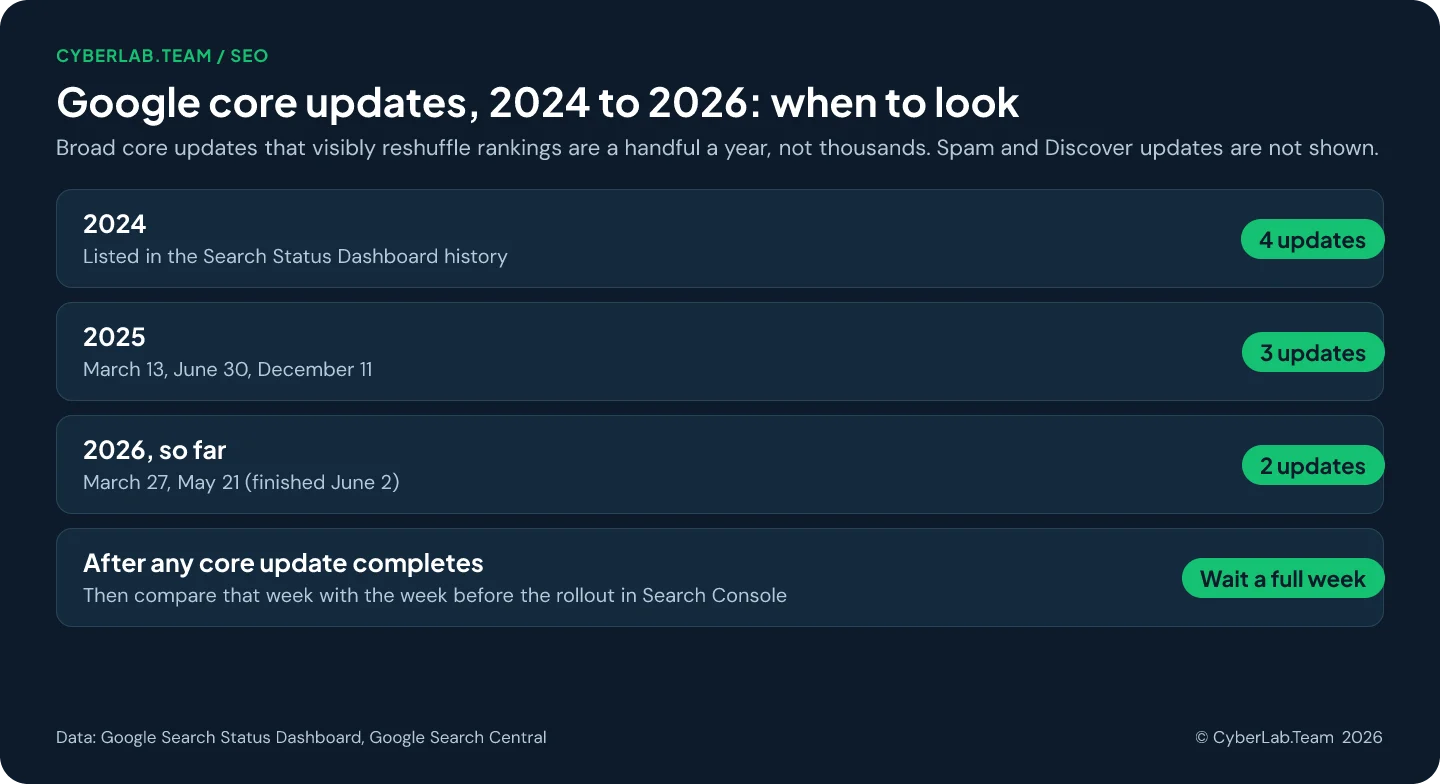
One number deserves a correction. The NAV43 guide backs its urgency with “over 5,000 algorithm updates annually” and gives no source. The closest figure Google publishes is on its How Search Works page: 4,781 launches in 2023, out of more than 700,000 experiments. Those are all changes shipped to Search that year; the broad core updates that visibly reshuffle rankings are a handful: the Search Status Dashboard lists four in 2024, three in 2025 and two so far in 2026. Thousands of small launches are a poor reason to re-audit a site where nothing changed.
What Google says about how often to look
Google gives two intervals and one trigger. Check Search Console about monthly and whenever you change content. Allow anywhere from a few hours to several months for a change to show up in results. Hire help early when a redesign or a new site is on the table, because problems are cheaper to prevent than to repair.
The SEO Starter Guide puts the timing this way: “Some changes might take effect in a few hours, others could take several months,” and in general you likely want to wait a few weeks to judge whether your work helped. If a fix needs weeks to register, a full audit every month mostly measures the wait.
On outside help, Do you need an SEO? names “a site redesign (the earlier, the better)” and the launch of a new site as the moments to hire. The same page lists a “review of your site content or structure” among the services a good SEO provides. And in its 2019 note on core updates, Google used the word itself: after a drop, “consider an audit of the drops you may have experienced.”
What the monthly check covers in Search Console
The monthly check is a quick pass through free reports Google already fills: search performance against the previous period, important pages dropping out of the index, any manual action or security issue, and page speed as real visitors experience it. It spots symptoms and rarely explains their cause.
- Performance. The report opens on the last three months; compare them with the previous period. When something looks off, switch to the last 16 months, which Google’s traffic drop guide recommends so a seasonal dip is not mistaken for a problem.
- Page indexing. Google’s help page is blunt: “You should not expect all URLs on your site to be indexed, only the canonical pages.” Watch your important pages, and ignore the long tail of filtered and duplicate URLs.
- Manual actions and security issues. Google flags a manual action both in its report and in the Search Console message center, and the security issues report lists hacked content, malware and deceptive pages. When both are empty, this step takes seconds, and it settles most worries about toxic backlinks.
- Core Web Vitals. The report uses field data from real Chrome users, judged at the 75th percentile over the last 28 days against thresholds web.dev sets at 2.5 seconds for LCP, 200 milliseconds for INP and 0.1 for CLS. A monthly look matches that window, though a small site may have too little data to appear.
- Recommendations. Since August 2024 the overview page can show suggestions built from indexing, crawling and serving data that was already in the tool.
What a full audit adds that Search Console cannot see
A full audit crawls every URL the way a bot does, reads your templates, weighs content against what searchers want, and compares you with competitors. Search Console reports what Google experienced on your site. An audit explains why, and ranks the fixes by what they are worth to the business.
The crawl is the mechanical part, and it is cheap. Screaming Frog crawls up to 500 URLs free, and its licence is €245 a year. Bing Webmaster Tools includes Site Scan, which launched in 2020 as a free crawl of up to 10,000 pages a month. A crawl finds redirect chains, orphan pages, duplicate titles, stray noindex tags and broken internal links.
Some faults only show up in the template. Google stops reading the head of a page at the first invalid element and ignores the metadata after it. The 2024 Web Almanac found a <div> inside the head on 11% of desktop and 10% of mobile pages, more than three times the 2022 rate of 4%. A tag manager snippet or a plugin can put it there, and no Search Console report names it.
Some decay happens without you touching anything. Pew Research Center found that 38% of webpages that existed in 2013 were no longer accessible a decade later, and that 23% of news pages contain at least one broken link. An Ahrefs study of more than two million sites found that at least 66.5% of links pointing to them over nine years are dead. For a site that never changes, that decay is the main reason to audit at all.
Deciding which findings matter is the part no tool does. John Mueller of Google warned that tool metrics are “tempting to optimize for (because you see a number),” with no shortcut behind them. A missing alt text on a page nobody visits and a noindex on your best service page can carry the same colored icon in a tool.
Before a redesign or relaunch
A redesign is the best moment to audit, because it changes far more than looks. Headings, titles, internal links and often URLs move with the design. An audit of the staging site before launch finds the losses while they are still free to fix, and a record of the old site makes later drops explainable.
Mueller put it directly in 2021: “If you change design, you generally change the content: headings, titles, images, internal linking, URL structure, accessibility, speed, etc.” A year earlier he advised splitting a large revamp into stages, because “if you do everything at once, you’ll never know what to fix.”
In practice: export every URL that gets traffic or links today and map each to its new address. Compare titles and headings page by page. Make sure the staging noindex and robots.txt blocks will come off on launch day. Google’s site move guide lists the same preparation: a URL mapping, updated internal links and both versions verified in Search Console. One such move is in our piece on moving from WordPress to EmDash.
After a migration or redesign goes live
The weeks after launch are the second audit window. Rankings usually wobble while Google recrawls the site, and the job is to separate that wobble from real damage: failed redirects, pages gone from the index, canonicals pointing the wrong way. Found in the first days, these are cheap to fix.
Google says to expect temporary fluctuation, and that for medium-sized websites “it can take a few weeks or more” before the new URLs replace the old ones in results, longer for large sites. Permanent redirects should stay “generally at least 1 year,” and Google suggests tracking the move through the Sitemaps, Page indexing and Performance reports.
Sitebulb’s March 2026 guide on migrations where the SEO arrives too late puts the same four checks first: redirect integrity, canonical signals, indexation compared with the old site, and sitemap accuracy. Our routine is a crawl of the full list of old URLs against the live site in the first days, then a second look at the indexing and performance reports a few weeks later.
After a drop that lines up with a core update
A drop during a core update calls for an audit of content and intent, and a technical checklist rarely explains it. First confirm the timing matches the update and rule out technical faults, security issues and seasonality. Then compare affected pages with what now ranks, and expect recovery, if it comes, to take months.
Core updates arrive “several times a year”. The Status Dashboard dates the recent ones: March 13, June 30 and December 11 in 2025; March 27 and May 21 in 2026, the last one finishing on June 2 after what Search Engine Roundtable described as major ranking volatility. Google recommends “waiting at least a full week after a core update completes before analyzing your site in Search Console,” then comparing that week with a week before the rollout.
Google’s traffic drop guide lists the other suspects: technical, security and spam issues, seasonality, site moves. If none fits, Google’s 2019 note is worth rereading: “There’s nothing wrong with pages that may perform less well in a core update.” It suggests asking people “you trust but who are unaffiliated with your site” for an honest assessment, advice repeated in the helpful content guidance. That is a fair description of an outside audit.
Google’s core update page says it “could take several months” for its systems to register improvements, though smaller core updates that go unannounced can move things in between, a point Search Engine Roundtable noted when the wording changed in December 2025. Mueller has also said that small tactical moves, like “disavowing 5 links,” will not fix a site hit this way.
A schedule sized to how often your site changes
Size the audit to how quickly the site changes, then add an audit after every big change regardless of the date. Google’s own thresholds show how much of an enterprise checklist a small site can skip: sitemaps are optional below about 500 pages, and crawl budget concerns sites with 10,000 or more pages that change daily.
Those figures come from Google’s sitemaps overview and crawl budget guide; the table itself is our judgment.
| Your site | Light check | Full audit |
|---|---|---|
| Brochure or service site, edited a few times a year | Search Console once a month | About once a year, plus before and after any redesign, migration or CMS change |
| Site that publishes or edits pages every week | Monthly, plus a look after every template or plugin update | About every six months |
| Shop or catalog with thousands of URLs changing daily | Monthly, plus a scheduled crawl | Quarterly, with crawl budget in scope |
| Any site after a migration, redesign or core update drop | Weekly for the first month | Now, whatever the calendar says |
For a site in the first row, extra audits mostly repeat the last findings; that money is better spent on the fixes.
What an audit cannot promise
An audit is a diagnosis. It can find what blocks crawling and indexing, show where content misses what searchers want, and put fixes in order. It cannot guarantee positions, dates, or a place in AI answers, and anyone who promises those is claiming control Google says nobody has.
“No one can guarantee a #1 ranking on Google,” says Do you need an SEO?. The core updates page adds that “there’s no guarantee that changes you make to your website will result in noticeable impact in search results.” On AI search, the AI features page says “there are no additional requirements to appear in AI Overviews or AI Mode, nor other special optimizations necessary.” The same SEO basics apply, as we argued in good SEO is good GEO.
An audit also changes nothing by itself. Ours is diagnosis and a roadmap, implementation is a separate job, and the value depends on how much of the list gets done.
How to set up your own audit rhythm
A small team can keep this routine with five habits: alerts that reach a real person, a monthly slot in the calendar, a log of site changes, a saved baseline after each audit, and full audits booked around planned changes. Of the five, the log is the one that explains a sudden traffic move months later.
Step 1. Make sure Search Console alerts reach someone
Verify every version of the domain and check whose inbox receives the messages. An alert for a manual action or hacked content is useless if it goes to a former developer. The URL Inspection tool is the quickest way to test a single page when an alert arrives.
Step 2. Put the monthly check in the calendar
Use the five reports above. Write down what you saw each month, even when it was nothing, so the next person has a reference.
Step 3. Keep a change log
Note the date of every redesign, theme or plugin update, hosting move, URL change and large content edit. When a drop appears, the log tells you whether to open the traffic drop guide or the Status Dashboard first.
Step 4. Save a baseline after each audit
Keep the crawl export and a Search Console export from the day the audit finished, so the next audit starts from a known state.
Step 5. Book full audits around your change dates
Schedule one before any redesign or migration, one in the weeks after launch, and one after a drop that matches a core update. Fill the gaps with the baseline cycle from the table.
If you would rather have a second pair of eyes, our SEO site audit is a one-time check with no subscription attached. When you are unsure whether you need one now, start with the free express review: a short conversation that tells you whether an audit is worth doing at this moment.
Sources
- Google Search Central, How to use Search Console
- Google Search Central, SEO Starter Guide
- Google Search Central, Do you need an SEO?
- Google Search Central, Google Search’s core updates and your website
- Danny Sullivan, What site owners should know about Google’s August 2019 core update, Google Search Central Blog, 1 August 2019
- Google Search Status Dashboard, Ranking updates history
- Google Search Central, Debugging drops in Google Search traffic
- Google Search Central, Site moves with URL changes
- Google Search Central, Redirects and Google Search
- Google, How Search Works: rigorous testing
- Google Search Central, Creating helpful, reliable, people-first content
- Google Search Central, AI features and your website
- Google Search Central, Valid page metadata
- Google Search Central, Sitemaps overview
- Google Search Central, Large site owner’s guide to managing crawl budget
- Search Console Help, Performance report
- Search Console Help, Page indexing report
- Search Console Help, Manual actions report
- Search Console Help, Security issues report
- Search Console Help, Core Web Vitals report
- Search Console Help, URL Inspection tool
- Moshe Samet, Introducing recommendations in Google Search Console, Google Search Central Blog, August 2024
- web.dev, Web Vitals
- Barry Schwartz, Revamping your web site? Google says split it up, Search Engine Roundtable, 24 July 2020
- Barry Schwartz, Google says website design changes generally lead to content changes, Search Engine Roundtable, 18 April 2021
- Barry Schwartz, Google’s John Mueller on recovering from core updates, Search Engine Roundtable, 28 May 2024
- Barry Schwartz, Google does smaller core updates without announcements, Search Engine Roundtable, 10 December 2025
- Barry Schwartz, Google May 2026 broad core update is done rolling out, Search Engine Roundtable, 2 June 2026
- Matt G. Southern, Google warns against over-reliance on SEO tool metrics, Search Engine Journal, 17 October 2024
- Matt G. Southern, Bing Site Scan tool audits sites for technical SEO issues, Search Engine Journal, 8 June 2020
- Screaming Frog, SEO Spider
- HTTP Archive, Web Almanac 2024: SEO
- Pew Research Center, When online content disappears, 17 May 2024
- Patrick Stox, At least 66.5% of links to sites in the last 9 years are dead, Ahrefs, updated 2 February 2024
- Kelly-Anne Crean, Rescuing a migration: a guide for SEOs brought in too late, Sitebulb, 31 March 2026
- Semrush, How often should you do an SEO audit?, January 2025
- Ahrefs SEO Glossary, SEO audit
- Peter Palarchio, How often should you do a technical SEO audit, NAV43, August 2025
- Richard Lesher, When should you do an SEO audit?, Volume Nine, updated March 2025
- Melwyn Joseph, How often should you audit your website?, WebYes, updated July 2026