


Google is testing a new dashboard for small businesses called Business Home. It puts your Business Profile, Google Ads, Merchant Center and YouTube accounts in one place and adds an AI assistant built on Gemini. As of November 2026 it is a closed beta for invited businesses in the US and the UK, so a café in Kraków or a florist in Kyiv cannot open it yet.
We read every page of the Business Home Help Center in a browser, along with the first industry reports and the screenshots Search Engine Roundtable published from a live account. Below is what the beta does today, who qualifies, what Google has only promised, and what a business outside the US and UK can prepare now.
What is Google Business Home?
Business Home is a single workspace where a business manages its Google presence instead of opening four tools separately. Google describes it as a “growth partner built with Gemini models” that connects your business tools. It sits on top of the accounts you already have and does not create a new listing.
The Help Center overview opens with a warning repeated on every page: Business Home “is currently a closed beta experience, available only to select business categories in the US and the UK.” The invitation email, which Barry Schwartz of Search Engine Roundtable quoted on 22 October 2026, says the beta “brings together your Business Profile, Merchant Center, YouTube, and Ads accounts all in one place.”
Schwartz also noticed that this brings a portal back. In 2021 Google renamed Google My Business to Business Profile and moved single businesses to editing in Search and Maps; the old dashboard had already been redesigned in tests a year earlier. If you still call it GMB, our piece on Google My Business versus Google Business Profile explains the rename.
What can you do in the beta today?
The beta already covers the routine work of a local profile: hours and contact details, reviews, posts, photos and a combined performance report. Around that sit AI tools for images and captions, a chat assistant, and a page that flags problems in each connected account. Most of it repeats what you can do elsewhere, now in one window.
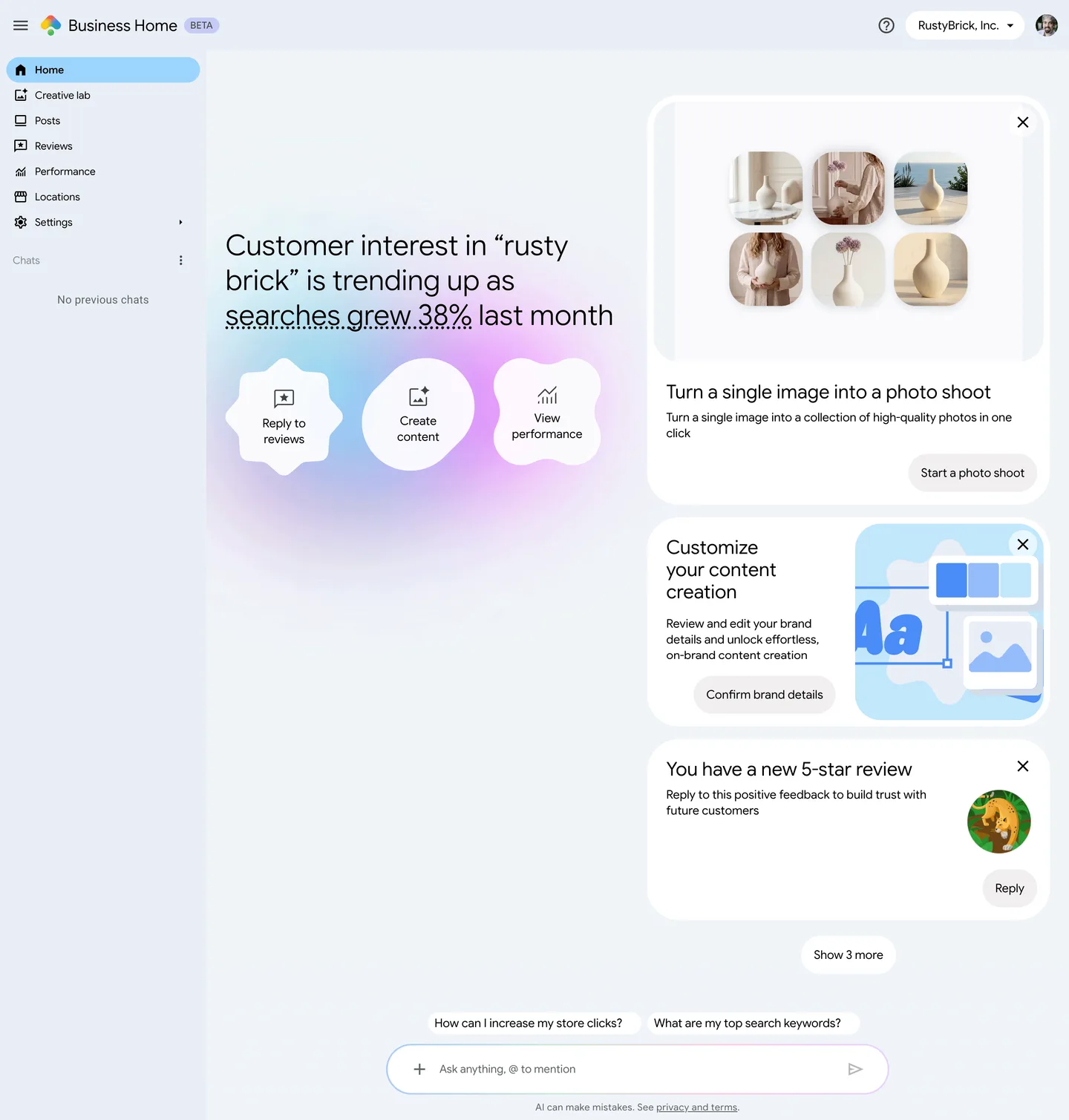
Google’s Help pages list these sections:
- Locations: Edit address, phone, website, hours, menus, services and photos, and reply to reviews and messages, for one business or a chain of up to 10 locations.
- Posts: Up to 10 photos per post, scheduling for a later date, a calendar with suggested topics, and publishing to the Business Profile and a YouTube channel. Instagram is not connected directly: you use Share on Social Media, which on a phone opens the post in the Instagram app. A published post can be deleted in Business Home but must be edited on the platform where it appeared.
- Creative lab: An AI image tool that turns a single photo into a “photo shoot” in several styles, makes variations, and swaps backgrounds. It also suggests images of its own based on praise in your reviews or popular products.
- Brand kit: Logo, colors, core values, tone of voice and visual style, which Business Home first guesses from your website and social profiles. Customers never see it; it only steers the AI suggestions.
- Reviews: Average rating across locations, the number still waiting for a reply, the last 28 days, filters, and a flag to dispute a review that breaks Google’s policies.
- Performance: One report that combines Business Profile, Merchant Center, Ads and YouTube, plus search trends and a comparison with similar businesses, which Google defines as “nearby businesses with comparable ratings that appear for similar customer searches.” The reviews card shows key themes from customer feedback.
- Ask Advisor: A chat assistant, covered in the AI section below.
- Messaging and tool statuses: AI-powered messaging through RCS for Business, and a status page for problems in each tool, from a profile suspension or a verification hold Google calls “Prep Mode” to Ads billing holds, rejected product feeds and YouTube copyright strikes.
Who can get access, and how?
Nobody can sign up. Google sends an email invitation to businesses it picks, and the email has a button that opens the dashboard. To be eligible, a business has to be based in the US or the UK, have a verified Business Profile, run fewer than 10 locations, operate a single type of business, and link no more than one account for each connected tool.
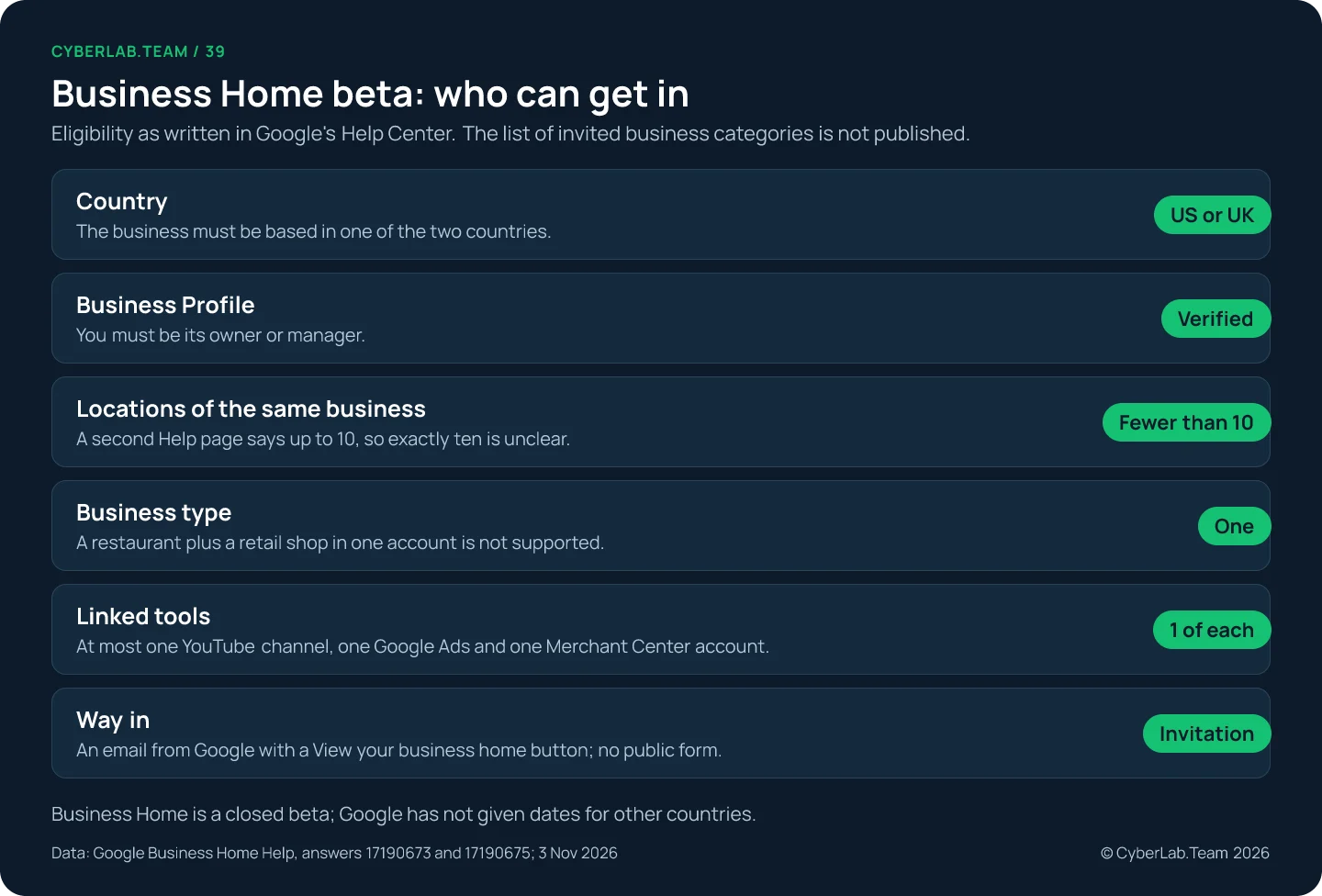
The eligibility list is short. An account that manages “multiple distinct businesses, such as owning both a restaurant and a retail shop,” is not supported, and the account must follow the policies of every connected tool. Google has not published which categories it invites, and the blogs that went looking, such as ALM Corp and Dead River Management, found no list either.
Two Google pages disagree on size. The overview says “fewer than 10 locations,” the page about managing profiles says “up to 10.” A chain with exactly ten locations cannot tell which applies, as Screpy and OnlyAClick also pointed out. For comparison, Google’s bulk verification starts at “10 or more” profiles of one business, so Business Home seems aimed at the businesses just below that line.
Blogs also disagree on whether there is a way in without the email. Dead River says there is no sign-up form or waitlist; ALM Corp describes an entry page that not everyone gets through. Signed out, we could not open that page, so we treat the invitation as the only confirmed route.
What Google says is still to come
Google separates what works today from what Business Home should do later. Recommendations of the single next step across all your tools, spotting sudden jumps in demand, and helping publish seasonal offers to social media are all described as future plans. A demo of them shows a roadmap; the beta you would get today does less.
The overview says that “Over time, Business Home will provide holistic insights and the next best step across all connected services,” and gives the example that it “detects real-time demand surges and helps you publish seasonal offers across social media.” That wording sits in Google’s own Help text, not only in blog retellings.
One screenshot hints at more tools. On the connected tools screen Schwartz published, Google Analytics appears next to Google Ads, Business Profile, Merchant Center and YouTube, although the Help pages name only the last four.
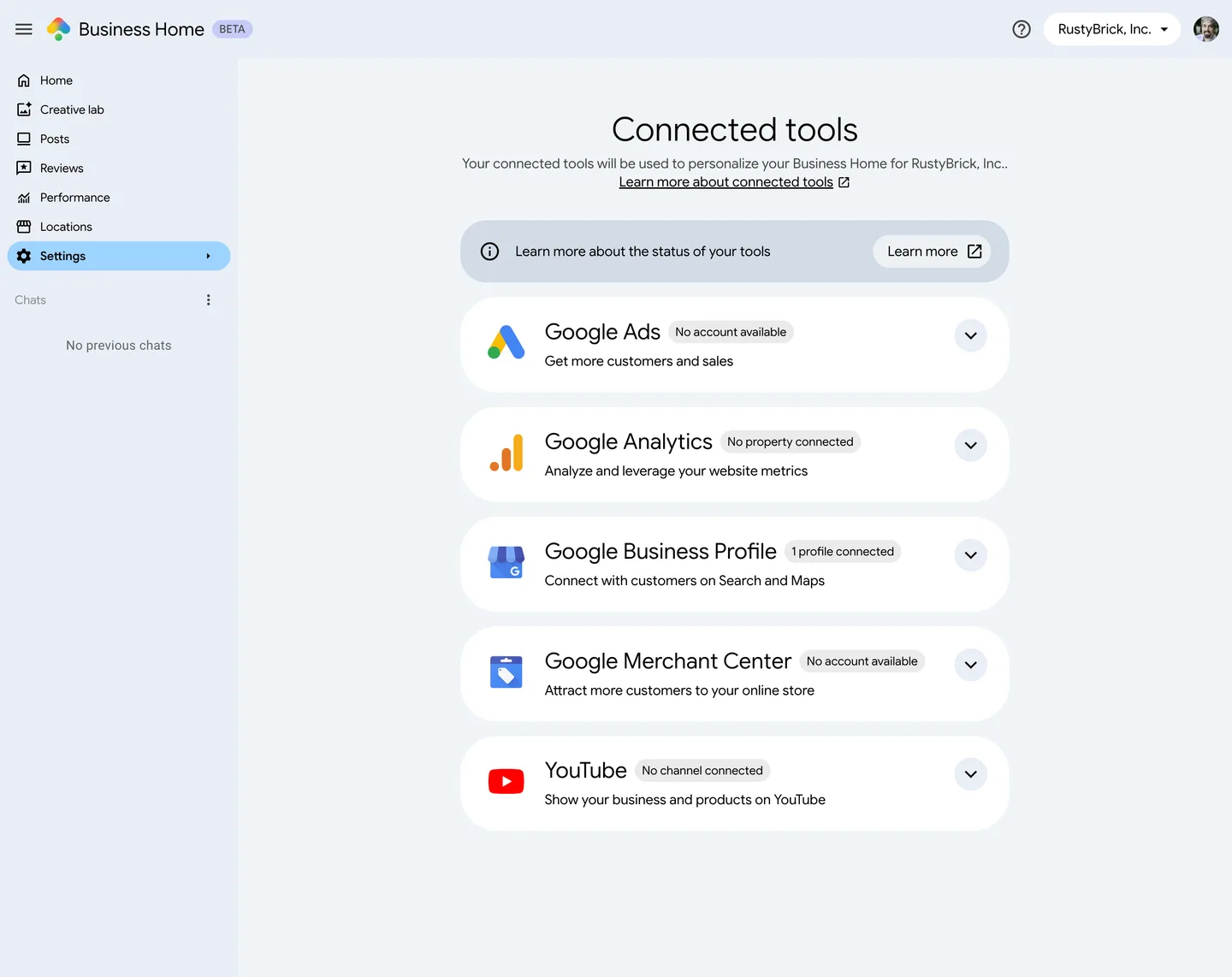
Some early videos promise even more. Edward Sturm’s Short lists Search Console and Gmail among the connected services; no Google page we read confirms that, so we leave it out.
How the AI features work, and where Google asks you to check
The AI writes captions, edits images, drafts review replies and answers questions about your numbers. Google keeps the final step with you: a reply goes live only after you confirm it, and the Help pages warn that answers can be wrong. Treat every AI output as a draft that someone who knows the business must read.
Ask Advisor, the chat assistant, can update hours, attributes, menus, photos and other profile details, explain performance, and give advice on Google Ads campaigns. Its Help page says that “Once you have selected and confirmed a review response, Ask Advisor can post the response on your behalf,” and admits it “may not generate accurate or relevant responses.”
The terms for Ask Advisor add two points worth knowing. Your chat activity, “disconnected from your Google Account, may be processed by human reviewers,” so keep customer data and anything confidential out of the chat. And Google says not to rely on it for medical, legal or financial advice.
Creative lab images carry their own risk. A generated “photo shoot” can make a dish or a product look different from what a customer receives, and Google requires compliance with its Generative AI Prohibited Use Policy. Before posting, we compare each image with the real item.
The Ask Advisor name also appears in Google Ads, where it is a separate beta announced in May. Gemini can connect to a Business Profile too, but that is another feature with its own rules: the Gemini Help page requires owner or manager access to only one verified profile and a personal Google Account. PPC Land reported in August that the profile connection now works for multi-location accounts, while the Help page we read still says one profile.
What changes for your Business Profile, and what does not
Your Business Profile stays the thing customers see in Search and Maps, and you can keep managing it there. Business Home is another way in, with the same permissions as before. Google’s rules for agencies, its API and the profile itself do not change because a dashboard was added on top.
Google says you can still “manage your Business Profile directly on Google Search and Maps,” and every action in Business Home needs the same role in the connected tool: posting to Search, Maps and YouTube requires owner or manager access to the profile and the channel. Owners and managers can already edit info, respond to reviews and manage posts without the new dashboard.
For agencies, the third-party policy still applies: “all end customers must retain ownership or co-ownership of their Business Profile at all times.” Business Home Help says nothing about agencies, and Screpy notes that agency setups need confirmation. The single business type rule also means one agency account cannot hold a portfolio of unrelated clients.
The Business Profile API changelog does not mention Business Home; its latest entry, from 9 October 2026, adds gluten-free and dairy-free menu labels. And no Google page claims that using the beta affects ranking.
The profile itself kept changing in the same weeks. Search Engine Roundtable covered a test of new performance reports inside the profile, which Schwartz called different from Business Home and “some what duplicative,” restaurant controls over ordering providers such as Uber Eats and DoorDash, also reported by Search Engine Journal, and wider access to AI-powered messaging, whose agent answers routine questions “instantly and at no cost.” Review appeals were delayed and posts briefly moved higher in the local panel.
When did Business Home appear?
There is no official launch date. Google’s Help pages carry none, and the industry learned about Business Home in stages: a short video in late September, the first detailed report on 22 October, and a monthly roundup in November saying it was rolling out. The date of a report is not proof of when the beta began.
The earliest public mention we found is Sturm’s video of 26 September 2026, whose description says “Google just rolled out Google Business Home.” Schwartz’s report followed 26 days later; he wrote that “It seems Google has been rolling this out slowly over the past couple of months.” His November roundup lists Business Home as rolling out, and Sterling Sky’s timeline of local changes lists it under 22 October.
What to do now if you are outside the US and UK
You cannot join the beta from Poland, Ukraine or the rest of the EU, and Google has given no date for other countries. What you can do is set up your accounts the way Business Home expects, so that the switch is quick if it arrives, and keep the profile work that any dashboard will build on.
The Polish agency MB-DM confirmed that Poland is not among the listed markets. The useful preparation is the same work a profile needs anyway:
- Roles: Make sure the business owner holds the owner role on the profile and that every agency or freelancer is a manager, as Google’s policy requires.
- One account per tool: Business Home accepts one YouTube channel, one Google Ads account and one Merchant Center account. If a past contractor left you with two Ads accounts or a stray channel, decide which one is the business’s and close or unlink the rest.
- Profile basics: Correct hours, categories, services and real photos are what any dashboard will read from; our Business Profile checklist walks through them.
- Reviews and posts: A steady habit of replying to reviews and posting updates is exactly what Business Home tries to speed up. Start it now in the profile itself.
- One place for numbers: If you want profile data next to your website traffic today, connect the profile to GA4.
This week, check roles and duplicate accounts. After that, watch three things: the country line on Google’s Help page, the new performance reports test in the profile, and whether Gemini’s profile connection reaches your account. If you would rather hand the routine to someone, our monthly profile management covers hours, posts, photos, review replies and a report, and we will add Business Home to the work as soon as our clients can open it.
Sources
All pages were accessed on 3 November 2026. Google’s Help pages carry no publication date. Quotes from Google were checked word for word on the live pages.
- Business Home Help, “About the Business Home beta”
- Business Home Help, “Manage your Business Profiles in Business Home beta”
- Business Home Help, “Create & manage posts in Business Home beta”
- Business Home Help, “Create & customize content with Creative lab”
- Business Home Help, “Manage your brand kit”
- Business Home Help, “Manage customer reviews in Business Home”
- Business Home Help, “Understand your business performance & insights”
- Business Home Help, “Status of connected tools”
- Business Home Help, “About Ask Advisor in Business Home beta”
- Business Home Help, “Ask Advisor in Business Home beta Terms of Use & Policies”
- Business Home Help Center, all articles
- Gemini Apps Help, “Manage your Business Profile on Google with the Gemini web app”
- Google, The Keyword, “Save time and grow your business with new Gemini tools”, 10 June 2026
- Google Ads Help, “Ask Advisor in Google Ads (beta)”
- Google, Ads & Commerce Blog, Ask Advisor, 20 May 2026
- Google Business Profile Help, “Manage your Business Profile owners & managers”
- Google Business Profile Help, policies for working with third parties
- Google Business Profile Help, “Verify Business Profiles in bulk”
- Google for Developers, Business Profile APIs change log
- Search Engine Roundtable, Google Business Home, new Business Profiles home, 22 October 2026
- Search Engine Roundtable, new performance reports in Business Profiles, 23 October 2026
- Search Engine Roundtable, ordering controls for restaurants, 28 October 2026
- Search Engine Roundtable, AI-powered messaging, 29 October 2026
- Search Engine Roundtable, review appeals delayed, 20 October 2026
- Search Engine Roundtable, Google Posts higher in the local panel, 19 October 2026
- Search Engine Roundtable, November 2026 Google webmaster report, 2 November 2026
- Search Engine Roundtable, Google My Business becomes Google Business Profile, 5 November 2021
- Search Engine Roundtable, Google My Business dashboard test, 20 November 2020
- Search Engine Journal, restaurants can opt out of ordering providers, 28 October 2026
- Sterling Sky, Google local changes timeline
- PPC Land, Business Profile in Gemini for multi-location accounts, 7 August 2026
- Edward Sturm, YouTube Short on Google Business Home, 26 September 2026
- Screpy, “Google Business Home beta”, 24 October 2026
- ALM Corp, Google tests Business Home, 27 October 2026
- Dead River Management, Google Business Home, 25 October 2026
- OnlyAClick, Business Home beta tools and access, 25 October 2026
- MB-DM, Google Business Home and AI business marketing, 23 October 2026


